
Open Discipline, click Edit rules, set your trading days and rules, then choose Save changes.
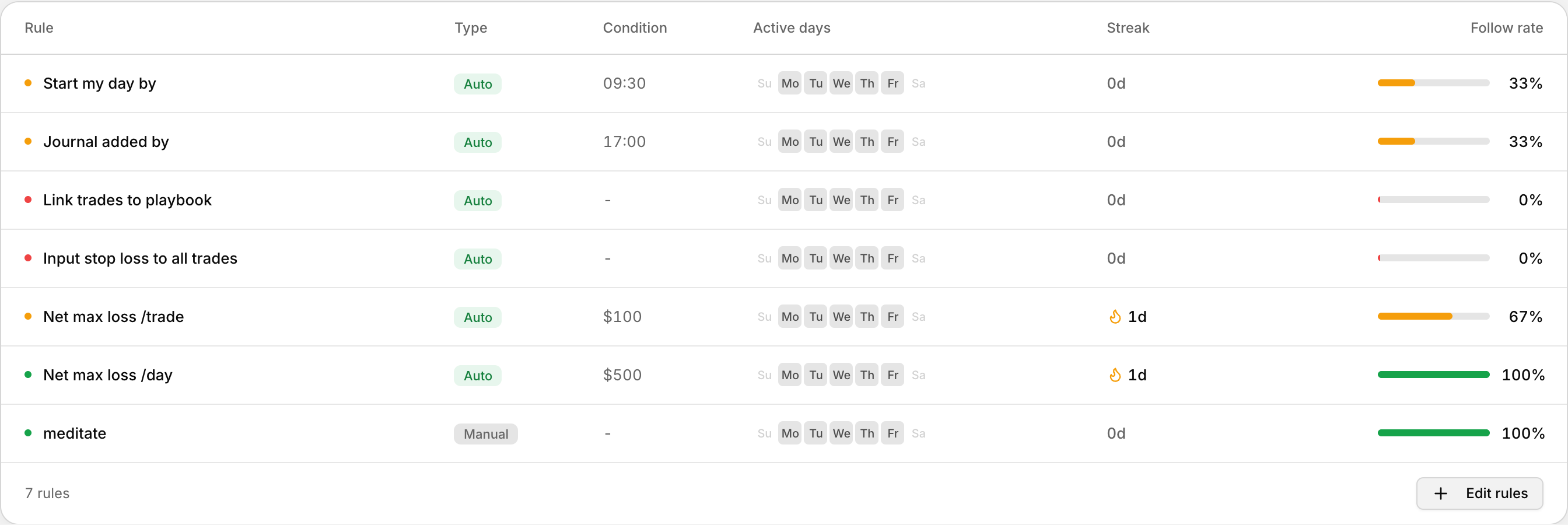 Each rule with its type, condition, active days and follow rate.
What you see on Discipline
- Current streak
- Today's progress
- Period score
- Active rules
Open the Rules dialog
- Go to Discipline in the left sidebar.
- Click Edit rules.
- The Rules dialog opens.
Changes you make only update your scoring for today and for future days.
Choose your trading days
- In the Rules dialog, find Trading days.
- Toggle the days you trade.
Rules are active only on the days you select. New setups default to Monday through Friday.
Turn on automated rules
Automated rules score from your trades and journals. You do not check them off by hand.
- Start my day by — finish your starting journal entry before this time.
- Journal added by — complete journal entries by this time after your session.
- Link trades to playbook — every trade you open must have a playbook attached.
- Input stop loss to all trades — every trade you open must have a stop loss.
- Net max loss /trade — maximum net loss allowed on a single trade.
- Net max loss /day — maximum net loss for the day across all accounts.
Start with a few rules that matter most, then add more as the habit sticks.
Add manual rules
- In the Rules dialog, go to Manual rules.
- Type a habit in the field.
- Click Add, or press Enter.
- To remove one, use the remove control next to it.
Then click Save changes.