What Is ChartLog?
ChartLog is a journaling and analytics platform for active equity traders. Adrian Campos and Igor Milivojevic built it in 2019 after independently developing similar tools as members of the Bear Bull Traders community, then combining their work. ChartLog has built a following among US stock day traders because of its charting.
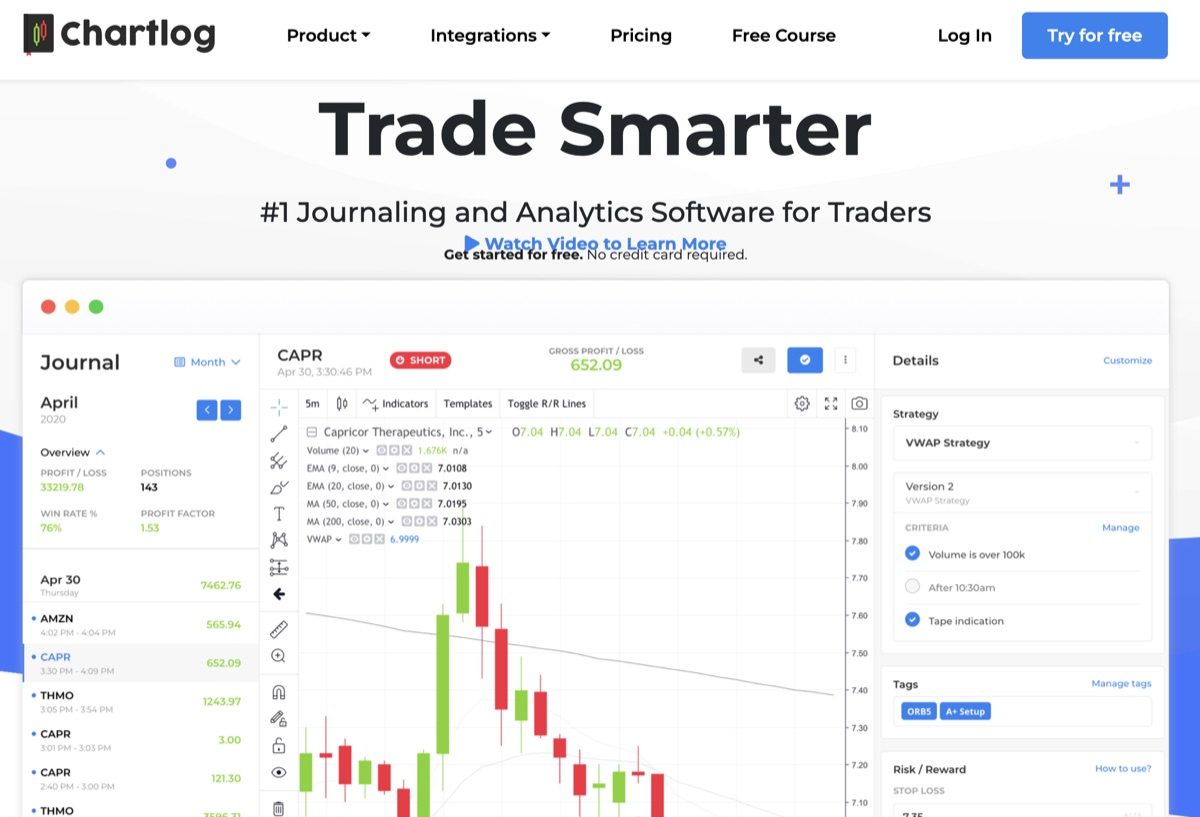
ChartLog integrates with 10 US stock and options brokers, displays each trade on a full TradingView chart with entries and exits marked, and organizes performance data around a strategy system.
For a US equity day trader using a supported broker, ChartLog provides a clean trade review workflow. Traders who use futures, forex, crypto, or an unsupported broker will need another platform.
Who ChartLog Is Built For
ChartLog is built for US equity traders. Its confirmed broker integrations are DAS Trader, E*TRADE, Interactive Brokers, Merrill Edge, Tastytrade, TD Ameritrade, Thinkorswim, TradeStation, TradeZero, and Webull. Each is a US stock or options platform.
ChartLog covers stocks and options. The platform's website does not mention support for futures, forex, or crypto.
That limits ChartLog to traders whose broker and asset classes fit within that range.
Key Features
TradingView-Powered Charts
Charting is ChartLog's clearest strength. Every imported trade receives a full TradingView chart with the exact entry and exit points marked. More than 100 indicators are available, and the chart type, timeframe, and indicator settings can be configured per trade or globally.
When you review a losing trade, ChartLog shows the price action with the entry and exit points placed on the chart. That makes it easier to see where the setup failed without switching between a journal and a separate charting tool.
Strategy Tracking
ChartLog's strategy feature lets traders define market conditions, entry triggers, and exit rules. Examples include a price above VWAP, a price drop below an EMA, a stop loss, or a profit target. Once a strategy is defined, trades can be tagged to it and performance can be tracked over time.
The sample set testing feature checks a strategy against historical data before you apply it to live trades. It is closer to a simplified backtest using your own trading history than to a full backtesting engine. It measures how the defined conditions matched past trade outcomes, rather than simulating how the strategy would perform on arbitrary historical data.
In practical terms, the feature filters historical trades instead of simulating them. A trader testing a VWAP-breakout setup can use it to check whether that setup was profitable over the past three months.
Trade Journal & Emotional Tracking
ChartLog is designed for daily journal entries. Those entries are subjective by design, giving traders a place to record the psychological context of each trading day.
That context can be reviewed alongside trading performance. A trader may follow strict rules and take quick stop losses on one day, then abandon those rules as losses mount on another. ChartLog's journal gives traders a way to record those changes in mood and decision-making.
Automatic Trade Import
Trade import is automatic and real-time once a broker is connected. ChartLog has 10 named broker integrations, compared with more than 140 for Trademetria and more than 700 for TraderSync.
For traders using one of ChartLog's supported platforms, setup takes minutes and trades appear in the journal immediately. Traders outside that list must enter trades manually.
ChartLog Pricing (2026)
ChartLog offers three plans: Lite, Standard, and Pro. All three support unlimited trade journaling and automatic imports from unlimited trading accounts. Every plan includes a seven-day free trial with no credit card required.
Lite
- Monthly Price
- $14.99/mo
- Annual Discount
- 10% off
- Key Features
- Trade journal + TradingView charts
Standard
- Monthly Price
- $29.99/mo
- Annual Discount
- 15% off
- Key Features
- Strategy tracking + performance tools
Pro
- Monthly Price
- $39.99/mo
- Annual Discount
- 20% off
- Key Features
- Full stats, custom reports, day-of-week breakdowns
| Plan | Monthly Price | Annual Discount | Key Features |
|---|---|---|---|
| Lite | $14.99/mo | 10% off | Trade journal + TradingView charts |
| Standard | $29.99/mo | 15% off | Strategy tracking + performance tools |
| Pro | $39.99/mo | 20% off | Full stats, custom reports, day-of-week breakdowns |
Pro adds the most detailed statistics and reports, including day-of-week breakdowns and combinations of strategy tags. It also lets traders create custom reports.
Standard or Pro are the relevant plans if you want to use strategy tagging, which Lite does not include. Pro's $39.99 monthly price is harder to justify against competitors.
ChartLog Pros & Cons
Pros:
- TradingView charts with entries and exits plotted on each trade
- Clean interface with a gentle learning curve
- Structured strategy tracking with historical sample-set testing
- Seven-day free trial with no credit card required
- Emotional and psychological journal entries built into the workflow
Cons:
- Stocks and options only. Futures, forex, and crypto are not supported.
- Only 10 broker integrations, compared with more than 700 for TraderSync and more than 140 for Trademetria.
- No native mobile app. ChartLog is web-based and accessible through a browser.
- No AI-powered analytics or natural-language query layer
- Live chat support is available only during business hours.
ChartLog vs. The Alternatives
The table compares ChartLog with TraderSync and RizeTrade.
Broker integrations
- ChartLog
- 10
- TraderSync
- 700+
- RizeTrade
- 800+
Asset classes
- ChartLog
- Stocks, Options
- TraderSync
- Stocks, Options, Futures, Forex, Crypto
- RizeTrade
- Stocks, Options, Futures, Forex
TradingView charts
- ChartLog
- ✅
- TraderSync
- ✅
- RizeTrade
- ✅
Strategy tracking
- ChartLog
- ✅
- TraderSync
- ✅
- RizeTrade
- ✅
Auto-generated reports
- ChartLog
- Limited
- TraderSync
- Yes
- RizeTrade
- 50+ reports
AI / advanced analytics
- ChartLog
- ❌
- TraderSync
- ✅
- RizeTrade
- ✅
Mobile app
- ChartLog
- ❌
- TraderSync
- ✅
- RizeTrade
- ✅
Starting price
- ChartLog
- $14.99/mo
- TraderSync
- ~$29.99/mo
- RizeTrade
- Free
| ChartLog | TraderSync | RizeTrade | |
|---|---|---|---|
| Broker integrations | 10 | 700+ | 800+ |
| Asset classes | Stocks, Options | Stocks, Options, Futures, Forex, Crypto | Stocks, Options, Futures, Forex |
| TradingView charts | ✅ | ✅ | ✅ |
| Strategy tracking | ✅ | ✅ | ✅ |
| Auto-generated reports | Limited | Yes | 50+ reports |
| AI / advanced analytics | ❌ | ✅ | ✅ |
| Mobile app | ❌ | ✅ | ✅ |
| Starting price | $14.99/mo | ~$29.99/mo | Free |
Is ChartLog Worth It?
ChartLog is worth considering for active US equity day traders and swing traders who use one of its 10 supported brokers. It is a good fit when clean TradingView charts and structured strategy tracking matter more than broad asset support or advanced analytics.
ChartLog's limits are clear. It does not cover futures, forex, or crypto. It has no mobile app or AI-driven analytics. At $39.99 per month, the Pro plan is also difficult to justify against competitors. At that rate, TraderSync Pro offers AI coaching, more than 700 broker integrations, trade replay, and MAE/MFE.
ChartLog is best viewed as a specialist journal for US stock and options traders, not as an all-purpose trading platform.
The Bottom Line: What Most Active Traders Actually Need
Choose ChartLog when your broker is supported, your trades are in stocks or options, and TradingView-based review is your priority.
If you trade across stocks, futures, and options, or need to import trades from a broker outside ChartLog's list, a broader platform will be easier to use.
RizeTrade connects to 800+ brokers and platforms, supports stocks, options, futures, and forex in one dashboard, and auto-generates 50+ performance reports when trades import. Its Free plan starts at $0 per month, which is less than ChartLog's Standard plan while covering more brokers and asset classes.
A trading journal is more useful when it includes all of the trades you need to review.